Showing posts with label arm. Show all posts

Tuesday, February 26, 2019

Linus Torvalds is wrong - PC no longer defines a platform

Hey, I can do these clickbait headlines too! Recently it has gotten media's attention that Linus is dismissive of ARM servers. The argument is roughly "Developers use X86 PCs, cross-platform development is painful, and therefor devs will use X86 servers, unless they get ARM PCs to play with".

This ignores the reality where majority of developers do cross-platform development every day. They develop on Mac and Windows PC's and deploy on Linux servers or mobile phones. The two biggest Linux success stories, cloud and Android, are built on cross-platform development. Yes, cross-platform development sucks. But it's just one of the many things that sucks in software development.

More importantly, the ship of "local dev enviroment" has long since sailed. Using Linus's other great innovation, git, developers push their code to a Microsoft server, which triggers a Rube Goldberg machine of software build, container assembly, unit tests, deployment to test environment and so on - all in cloud servers.

Yes, the ability to easily by a cheap whitebox PC from CompUSA was the important factor in making X86 dominate server space. But people get cheap servers from cloud now, and even that is getting out of fashion. Services like AWS lambda abstract the whole server away, and the instruction set becomes irrelevant. Which CPU and architecture will be used to run these "serverless" services is not going to depend on developers having Arm Linux Desktop PC's.

Of course there are still plenty of people like me who use Linux Desktop and run things locally. But in the big picture things are just going one way. The way where it gets easier to test things in your git-based CI loop rather than in local development setup.

But like Linus, I still do want to see an powerful PC-like Arm NUC or Laptop. One that could run mainline Linux kernel and offer a PC-like desktop experience. Not because ARM depends on it to succeed in server space (what it needs is out of scope for this blogpost) - but because PC's are useful in their own.

Tuesday, February 13, 2018

Making sense of /proc/cpuinfo on ARM

Ever stared at output of /proc/cpuinfo and wondered what the CPU is?
...
processor       : 7
BogoMIPS        : 2.40
Features        : fp asimd evtstrm aes pmull sha1 sha2 crc32 cpuid
CPU implementer : 0x41
CPU architecture: 8
CPU variant     : 0x0
CPU part        : 0xd03
CPU revision    : 3
Or maybe like:
$ cat /proc/cpuinfo
processor       : 0
model name      : ARMv7 Processor rev 2 (v7l)
BogoMIPS        : 50.00
Features        : half thumb fastmult vfp edsp thumbee vfpv3 tls idiva idivt vfpd32 lpae
CPU implementer : 0x56
CPU architecture: 7
CPU variant     : 0x2
CPU part        : 0x584
CPU revision    : 2
...
The bits "CPU implementer" and "CPU part" could be mapped to human understandable strings. But the Kernel developers are heavily against the idea. Therefor, to the next idea: Parse in userspace. Turns out, there is a common tool almost everyone has installed does similar stuff. lscpu(1) from util-linux. So I proposed a patch to do ID mapping on arm/arm64 to util-linux, and it was accepted! So using lscpu from util-linux 2.32 (hopefully to be released soon) the above two systems look like:
Architecture:        aarch64
Byte Order:          Little Endian
CPU(s):              8
On-line CPU(s) list: 0-7
Thread(s) per core:  1
Core(s) per socket:  4
Socket(s):           2
NUMA node(s):        1
Vendor ID:           ARM
Model:               3
Model name:          Cortex-A53
Stepping:            r0p3
CPU max MHz:         1200.0000
CPU min MHz:         208.0000
BogoMIPS:            2.40
L1d cache:           unknown size
L1i cache:           unknown size
L2 cache:            unknown size
NUMA node0 CPU(s):   0-7
Flags:               fp asimd evtstrm aes pmull sha1 sha2 crc32 cpuid
And
$ lscpu
Architecture:        armv7l
Byte Order:          Little Endian
CPU(s):              4
On-line CPU(s) list: 0-3
Thread(s) per core:  1
Core(s) per socket:  4
Socket(s):           1
Vendor ID:           Marvell
Model:               2
Model name:          PJ4B-MP
Stepping:            0x2
CPU max MHz:         1333.0000
CPU min MHz:         666.5000
BogoMIPS:            50.00
Flags:               half thumb fastmult vfp edsp thumbee vfpv3 tls idiva idivt vfpd32 lpae
As we can see, lscpu is quite versatile and can show more information than just what is available in cpuinfo.

Friday, June 23, 2017

Cross-compiling with debian stretch

Debian stretch comes with cross-compiler packages for selected architectures:
 $ apt-cache search cross-build-essential
crossbuild-essential-arm64 - Informational list of cross-build-essential packages for
crossbuild-essential-armel - ...
crossbuild-essential-armhf - ...
crossbuild-essential-mipsel - ...
crossbuild-essential-powerpc - ...
crossbuild-essential-ppc64el - ...
⏎                                                                                       
Lets have a quick exact steps guide. But first - while you can use do all this in your desktop PC rootfs, it is more wise to contain yourself. Fortunately, Debian comes with a container tool out of box:
sudo debootstrap stretch /var/lib/container/stretch http://deb.debian.org/debian
echo "strech_cross" | sudo tee /var/lib/container/stretch/etc/debian_chroot
sudo systemd-nspawn -D /var/lib/container/stretch
Then we set up cross-building enviroment for arm64 inside the container:
# Tell dpkg we can install arm64
dpkg --add-architecture arm64
# Add src line to make "apt-get source" work
echo "deb-src http://deb.debian.org/debian stretch main" >> /etc/apt/sources.list
apt-get update
# Install cross-compiler and other essential build tools
apt install --no-install-recommends build-essential crossbuild-essential-arm64
Now we have a nice build enviroment, lets choose something more complicated than the usual kernel/BusyBox to cross-build, qemu:
# Get qemu sources from debian
apt-get source qemu
cd qemu-*
# New in stretch: build-dep works in unpacked source tree 
apt-get build-dep -a arm64 .
# Cross-build Qemu for arm64
dpkg-buildpackage -aarm64 -j6 -b
Now that works perfectly for Qemu. For other packages, challenges may appear. For example you may have to se "nocheck" flag to skip build-time unit tests. Or some of the build-dependencies may not be multiarch-enabled. So work continues :)

Monday, May 9, 2016

Booting ubuntu 16.04 cloud images on Arm64

For testing kvm/qemu, prebaked images cloud images are nice. However, there is a few steps to get started. First we need a recent Qemu (2.5 is good enough). An efi firmware is needed, and cloud-utils, for customizing our VM.
sudo apt install -y qemu qemu-utils cloud-utils
wget https://releases.linaro.org/components/kernel/uefi-linaro/15.12/release/qemu64/QEMU_EFI.fd
wget https://cloud-images.ubuntu.com/xenial/current/xenial-server-cloudimg-arm64-uefi1.img
Cloud images are plain - there is no user setup, no default user/pw combo, so to log in to the image, we need to customize the image on first boot. The defacto tool for this is cloud-init. The simplest method for using cloud-init is passing a block media with a settings file - of course for real cloud deployment, you would use one of fancy network based initialization protocols cloud-init supports. Enter the following to a file, say cloud.txt:
#cloud-config

users:
  - name: you
    ssh-authorized-keys:
      - ssh-rsa AAAAB3Nz....
    sudo: ['ALL=(ALL) NOPASSWD:ALL']
    groups: sudo
    shell: /bin/bash
This minimal config will just set you a user with ssh key. A more complex setup can install packages, write files and run arbitrary commands on first boot. In professional setups, you would most likely end up using cloud-init only to start Ansible or another configuration management tool.
cloud-localds cloud.img cloud.txt
qemu-system-aarch64 -smp 2 -m 1024 -M virt -bios QEMU_EFI.fd -nographic \
       -device virtio-blk-device,drive=image \
       -drive if=none,id=image,file=xenial-server-cloudimg-arm64-uefi1.img \
       -device virtio-blk-device,drive=cloud \
       -drive if=none,id=cloud,file=cloud.img \
       -netdev user,id=user0 -device virtio-net-device,netdev=user0 -redir tcp:2222::22 \
       -enable-kvm -cpu host 
If you are on an X86 host and want to use qemu to run an aarch64 image, replace the last line with "-cpu cortex-a57". Now, since the example uses user networking with tcp port redirect, you can ssh into the VM:
ssh -p 2222 you@localhost
Welcome to Ubuntu 16.04 LTS (GNU/Linux 4.4.0-22-generic aarch64)
....

Monday, November 23, 2015

Using ser2net for serial access.

Is your table a mess of wires? Do you have multiple devices connected via serial and can't remember which is /dev/ttyUSBX is connected to what board? Unless you are a embedded developer, you are unlikely to deal with serial much anymore - In that case you can just jump to the next post in your news feed.

Introducting ser2net

Usually people start with minicom for serial access. There are better tools - picocom, screen, etc. But to easily map multiple serial ports, use ser2net. Ser2net makes serial ports available over telnet.

Persistent usb device names and ser2net

To remember which usb-serial adapter is connected to what, we use the /dev/serial tree created by udev, in /etc/ser2net.conf:
# arndale
7004:telnet:0:'/dev/serial/by-path/pci-0000:00:1d.0-usb-0:1.8.1:1.0-port0':115200 8DATABITS NONE 1STOPBIT
# cubox
7005:telnet:0:/dev/serial/by-id/usb-Prolific_Technology_Inc._USB-Serial_Controller_D-if00-port0:115200 8DATABITS NONE 1STOPBIT
# sonic-screwdriver
7006:telnet:0:/dev/serial/by-id/usb-FTDI_FT230X_96Boards_Console_DAZ0KA02-if00-port0:115200 8DATABITS NONE 1STOPBIT
The by-path syntax is needed, if you have many identical usb-to-serial adapters. In that case a Patch from BTS is needed to support quoting in serial path. Ser2net doesn't seems very actively maintained upstream - a sure sign that project is stagnant is a homepage still at sourceforge.net... This patch among other interesting features can be also be found in various ser2net forks in github.

Setting easy to remember names

Finally, unless you want to memorize the port numbers, set TCP port to name mappings in /etc/services:
# Local services
arndale            7004/tcp
cubox              7005/tcp
sonic-screwdriver  7006/tcp
Now finally:
telnet localhost sonic-screwdriver
^Mandatory picture of serial port connection in action

Friday, September 4, 2015

Migration to Scaleway ARM server

The C1 Server

Scaleway started selling ARM based hosted server in April. I've intended to blog about this for a while, since it was time to upgrade from wheezy to jessie was timely, why not switch provider from an X86 based to ARM one at the same time?

In many ways scaleway node is opposite to what "Enterprise ARM" people are working on. Each server is based on an oldish ARMv7 Quad-Core Marvell Armada XP, instead of a brand new 64-bit ARMv8 cpu. There is no UEFI, ACPI or any other "industry standards" involved, just a smooth web interface and a command line tool to manage your node(s). And the node is yours, it's not shared with others with virtualization. The picture above is a single node, which is stacked with 911 other nodes into a single rack.

This week, the C1 price was dropped to a very reasonable €2.99 per month, or €0.006 per hour.

Software runs on hardware, news at 11

The performance is more than enough for my needs - shell, email and light web serving. dovecot, postfix, irssi and apache2 are just an apt-get away. Anyone who says you need x86 for Linux servers is forgetting that Linux software is open source, and if not already available, can be compiled to any architecture with little effort. Thus the migration pains were only because I chose to modernize configuration of dovecot and friends. Details of the new setup shall be left for another post.

Thursday, November 6, 2014

Adventures in setting up local lava service

Linaro uses LAVA as a tool to test variety of devices. So far I had not installed it myself, mostly due to assuming it to be enermously complex to set up. But thanks to Neil Williams work on packaging, installation has got a lot easier. Follow the Official Install Doc and Official install to debian Doc, roughly looking like:

1. Install Jessie into kvm

kvm -m 2048 -drive file=lava2.img,if=virtio -cdrom debian-testing-amd64-netinst.iso
2. Install lava-server
apt-get update; apt-get install -y postgresql nfs-kernel-server apache2
apt-get install lava-server
# answer debconf questions
a2dissite 000-default && a2ensite lava-server.conf 
service apache2 reload
lava-server manage createsuperuser --username default --email=foo.bar@example.com
$EDITOR /etc/lava-dispatcher/lava-dispatcher.conf # make sure LAVA_SERVER_IP is right
That's the generic setup. Now you can point your browser to the IP address of the kvm machine, and log in with the default user and the password you made.

3 ... 1000 Each LAVA instance is site customized for the boards, network, serial ports, etc. In this example, I now add a single arndale board.

cp /usr/lib/python2.7/dist-packages/lava_dispatcher/default-config/lava-dispatcher/device-types/arndale.conf /etc/lava-dispatcher/device-types/
sudo /usr/share/lava-server/add_device.py -s arndale arndale-01 -t 7001
This generates us a almost usable config for the arndale. For site specifics I have usb-to-serial. Outside kvm, I provide access to serial ports using the following ser2net config:
7001:telnet:0:/dev/ttyUSB0:115200 8DATABITS NONE 1STOPBIT
7002:telnet:0:/dev/ttyUSB1:115200 8DATABITS NONE 1STOPBIT
TODO: make ser2net not run as root and ensure usb2serial devices always get same name..

For automatic power reset, I wanted something cheap, yet something that wouldn't require much soldering (I'm not a real embedded engineer.. I prefer software side ;) . Discussed with Hector, who hinted about prebuilt relay boxes. Chose one from Ebay, a kmtronic 8-port USB Relay. So now I have this cute boxed nonsense hack.

The USB relay is driven with a short script, hard-reset-1

stty -F /dev/ttyACM0 9600
echo -e '\xFF\x01\x00' > /dev/ttyACM0
sleep 1
echo -e '\xFF\x01\x01' > /dev/ttyACM0
Sidenote: If you don't have or want automated power relay for lava, you can always replace this this script with something along "mpg123 puny_human_press_the_power_button_now.mp3"

Both the serial port and reset script are on server with dns name aimless. So we take the /etc/lava-dispatcher/devices/arndale-01.conf that add_device.py created and make it look like:

device_type = arndale
hostname = arndale-01
connection_command = telnet aimless 7001
hard_reset_command = slogin lava@aimless -i /etc/lava-dispatcher/id_rsa /home/lava/hard-reset-1
Since in my case I'm only going to test with tftp/nfs boot, the arndale board needs only to be setup to have a u-boot bootloader ready on power-on.

Now everything is ready for a test job. I have a locally built kernel and device tree, and I export the directory using the httpd available by default in debian.. Python!

cd out/
python -m SimpleHTTPServer
Go to the lava web server, select api->tokens and create a new token. Next we add the token and use it to submit a job
$ sudo apt-get install lava-tool
$ lava-tool auth-add http://default@lava-server/RPC2/
$ lava-tool submit-job http://default@lava-server/RPC2/ lava_test.json
submitted as job id: 1
$
The first job should now be visible in the lava web frontend, in the scheduler -> jobs part. If everything goes fine, the relay will click in a moment and the job will finish in a few minutes.

Wednesday, August 13, 2014

Booting Linaro ARMv8 OE images with Qemu

A quick update - Linaro ARMv8 OpenEmbbeded images work just fine with qemu 2.1 as well:
$ http://releases.linaro.org/14.07/openembedded/aarch64/Image
$ http://releases.linaro.org/14.07/openembedded/aarch64/vexpress64-openembedded_lamp-armv8-gcc-4.9_20140727-682.img.gz
$ qemu-system-aarch64 -m 1024 -cpu cortex-a57 -nographic -machine virt \
 -kernel Image -append 'root=/dev/vda2 rw rootwait mem=1024M console=ttyAMA0,38400n8' \
 -drive if=none,id=image,file=vexpress64-openembedded_lamp-armv8-gcc-4.9_20140727-682.img \
 -netdev user,id=user0 -device virtio-net-device,netdev=user0  -device virtio-blk-device,drive=image 
[    0.000000] Linux version 3.16.0-1-linaro-vexpress64 (buildslave@x86-64-07) (gcc version 4.8.3 20140401 (prerelease) (crosstool-NG linaro-1.13.1-4.8-2014.04 - Linaro GCC 4.8-2014.04) ) #1ubuntu1~ci+140726114341 SMP PREEMPT Sat Jul 26 11:44:27 UTC 20
[    0.000000] CPU: AArch64 Processor [411fd070] revision 0
...
root@genericarmv8:~# 
Quick benchmarking with age-old ByteMark nbench:
Index Qemu Foundation Host
Memory 4.294 0.712 44.534
Integer 6.270 0.686 41.983
Float 1.463 1.065 59.528
Baseline (LINUX) : AMD K6/233*
Qemu is upto 8x faster than Foundation model on Integers, but only 50% faster on Math. Meanwhile, the Host pc spends 7-40x slower emulating ARMv8 than executing native instructions.

Tuesday, August 5, 2014

Testing qemu 2.1 arm64 support

Qemu 2.1 was just released a few days ago, and is now a available on Debian/unstable. Trying out an (virtual) arm64 machine is now just a few steps away for unstable users:
$ sudo apt-get install qemu-system-arm 
$ wget https://cloud-images.ubuntu.com/trusty/current/trusty-server-cloudimg-arm64-disk1.img
$ wget https://cloud-images.ubuntu.com/trusty/current/unpacked/trusty-server-cloudimg-arm64-vmlinuz-generic
$ qemu-system-aarch64 -m 1024 -cpu cortex-a57 -nographic -machine virt -kernel trusty-server-cloudimg-arm64-vmlinuz-generic \ 
-append 'root=/dev/vda1 rw rootwait mem=1024M console=ttyAMA0,38400n8 init=/usr/lib/cloud-init/uncloud-init ds=nocloud ubuntu-pass=randomstring' \
-drive if=none,id=image,file=trusty-server-cloudimg-arm64-disk1.img \
-netdev user,id=user0 -device virtio-net-device,netdev=user0 -device virtio-blk-device,drive=image 
[    0.000000] Linux version 3.13.0-32-generic (buildd@beebe) (gcc version 4.8.2 (Ubuntu/Linaro 4.8.2-19ubuntu1) ) #57-Ubuntu SMP Tue Jul 15 03:52:14 UTC 2014 (Ubuntu 3.13.0-32.57-generic 3.13.11.4)
[    0.000000] CPU: AArch64 Processor [411fd070] revision 0
...
-snip-
...
ubuntu@ubuntu:~$ cat /proc/cpuinfo 
Processor       : AArch64 Processor rev 0 (aarch64)
processor       : 0
Features        : fp asimd evtstrm 
CPU implementer : 0x41
CPU architecture: AArch64
CPU variant     : 0x1
CPU part        : 0xd07
CPU revision    : 0

Hardware        : linux,dummy-virt
ubuntu@ubuntu:~$
The "init=/usr/lib/cloud-init/uncloud-init ds=nocloud ubuntu-pass=randomstring" is ubuntu cloud stuff that will set the ubuntu user password to "randomstring" - don't use "randomstring" literally there, if you are connected to internets...

For more detailed writeup of using qemu-system-aarch64, check the excellent writeup from Alex Bennee.

Thursday, May 8, 2014

Arm builder updates

Debian has recently received a donation of 8 build machines from Marvell. The new machines come with Quad core MV78460 Armada XP CPU's, DDR3 DIMM slot so we can plug in more memory, and speedy sata ports. They replace the well served Marvell MV78200 based builders - ones that have been building debian armel since 2009. We are planning a more detailed announcement, but I'll provide a quick summary:

The speed increase provided by MV78460 can viewed by comparing build times on selected builds since early april:

Qemu build times.

We can now build Qemu in 2h instead of 16h -8x faster than before! Certainly a substantial improvement, so impressive kit from Marvell! But not all packages gain this amount of speedup:

webkitgtk build times.

This example, webkitgtk, builds barely 3x faster. The explanation is found from debian/rules of webkitgkt:

# Parallel builds are unstable, see #714072 and #722520
# ifneq (,$(filter parallel=%,$(DEB_BUILD_OPTIONS)))
#   NUMJOBS = $(patsubst parallel=%,%,$(filter parallel=%,$(DEB_BUILD_OPTIONS)))
#   MAKEARGUMENTS += -j$(NUMJOBS)
# endif
The old builders are single-core[1], so the regardless of parallel building, you can easily max out the cpu. New builders will use only 1 of 4 cores without parallel build support in debian/rules.

During this buildd cpu usage graph, we see most time only one CPU is consumed. So for fast package build times.. make sure your packages supports parallel building.

For developers, abel.debian.org is porter machine with Armada XP. It has schroot's for both armel and armhf. set "DEB_BUILD_OPTIONS=parallel=4" and off you go.

Finally I'd like to thank Thomas Petazzoni, Maen Suleiman, Hector Oron, Steve McIntyre, Adam Conrad and Jon Ward for making the upgrade happen.

Meanwhile, we have unrelated trouble - a bunch of disks have broken within a few days apart. I take the warranty just run out...

[1] only from Linux's point of view. - mv78200 has actually 2 cores, just not SMP or coherent. You could run an RTOS on the other core while you run Linux on the other.
Friday, February 21, 2014

Where the armel buildd time went

Wanna-build, wanna-build, which packages spent most time on armel buildd's since beginning of 2013?
         package         | sum(build_time)
-------------------------+--------------
 libreoffice             | 114 09:16:34
 linux                   | 113 02:58:50
 gcc-4.8                 | 064 01:21:09
 webkitgtk               | 059 19:09:27
 acl2                    | 043 16:40:50
 gcc-4.7                 | 028 14:03:53
 iceweasel               | 026 19:02:13
 gcc-snapshot            | 026 01:31:21
 openjdk-7               | 020 02:41:53
 php5                    | 019 16:13:22
 llvm-toolchain-3.3      | 017 19:05:38
 qt4-x11                 | 017 02:57:09
 espresso                | 016 03:50:37
 pypy                    | 015 07:07:25
 icedove                 | 014 18:57:08
 insighttoolkit4         | 014 17:16:43
 qtbase-opensource-src   | 014 12:39:09
 llvm-toolchain-3.4      | 012 03:06:15
 mono                    | 011 22:30:13
 atlas                   | 011 20:40:54
 qemu                    | 011 17:11:09
 calligra                | 011 16:05:55
 gnuradio                | 011 15:19:35
 resiprocate             | 011 10:14:56
 llvm-toolchain-snapshot | 011 02:04:44
 libav                   | 010 13:52:03
 python2.7               | 009 18:58:33
 ghc                     | 009 18:28:48
 gnat-4.8                | 009 13:59:57
 axiom                   | 009 12:40:24
 cython                  | 009 00:47:04
 openjdk-6               | 008 16:38:14
 oce                     | 008 10:29:20
 eglibc                  | 008 06:04:26
 ppl                     | 007 20:48:45
 root-system             | 007 17:32:16
 openturns               | 007 10:12:53
 gcl                     | 007 08:02:42
 gcc-4.6                 | 007 02:50:48
 k3d                     | 007 00:36:11
 python3.3               | 007 00:25:42
 llvm-toolchain-3.2      | 007 00:17:59
 vtk                     | 006 17:53:28
 samba                   | 006 17:17:27
 mysql-workbench         | 006 14:36:46
 kde-workspace           | 006 07:31:12
 gmsh                    | 006 04:32:42
 psi-plus                | 006 04:30:08
 octave                  | 006 04:17:22
 paraview                | 006 04:13:25
Timeformat is "days HH:MM:SS". Our ridiculously stable mv78x00 buildd's have served well, but has come to become let them rest. Now, to find out how many of these top time consuming packages can build with parallel make and are not doing so already.

Monday, October 22, 2012

F-droid store for android

Christopher complained that in android, you need a user account to install software. That is not true, there is F-droid which is a catalog of Free/Open Source Software, no user account needed.

Lack of multitasking is yes annoying sometimes, yes, but that is really a poweruser problem. Most users don't load web pages in background while playing. Most users will simply not bother with web pages that take too long to load. Given the choice, most users will prefer a snappy UI over a UI that allows proper multitasking. N900 was never snappy, stutters were common, and it would often hang for long times if you had too many apps or browser windows open at the same time. Even for Android there are way more complaints about non-fluid UI than lack of proper multitasking. It is thus only logical for the Android developers to concentrate in developing a snappier UI over improving multitasking.

The fact that Android has given 400+ million Linux computers out in the hands of consumers is one of the MOST AMAZING THINGS ever. But it seems others on FOSS community seem to consider Android a rather unfortunate event, because it's not "Real Linux" or "100% free software" or "because it's not bug free". Err, like Maemo or MeeGo ever is any of those...

It is fair to complain about usability quirks Android as enduser. But if you believe Free Software, you should also see the opportunity the open source parts of Android provides to you fix it to your needs. After all, the point of Free Software is that you don't need to depend on the upstream to fix you everything? Christoph complains that the stock email app is lacking. Android Email app is Open Source (Maemo and N9 email apps are not). Android email has been forked as K-9 Mail. The app lifecycle is fixable allowing you to return from browser to the mail you were at - at least a plenty of other apps manage to do that.

The question is, are we consumers or creators. If we are just sitting waiting to Google provide us a perfect shrinkwrapped Android, we could just as well use iPhone or Windows phone. We should instead see Android as an opportunity - when it's 90% open source, fix the remaining closed source bits like open source 3D drivers and open source replacements for proprietary interfaces.

Wednesday, January 18, 2012

CuBox


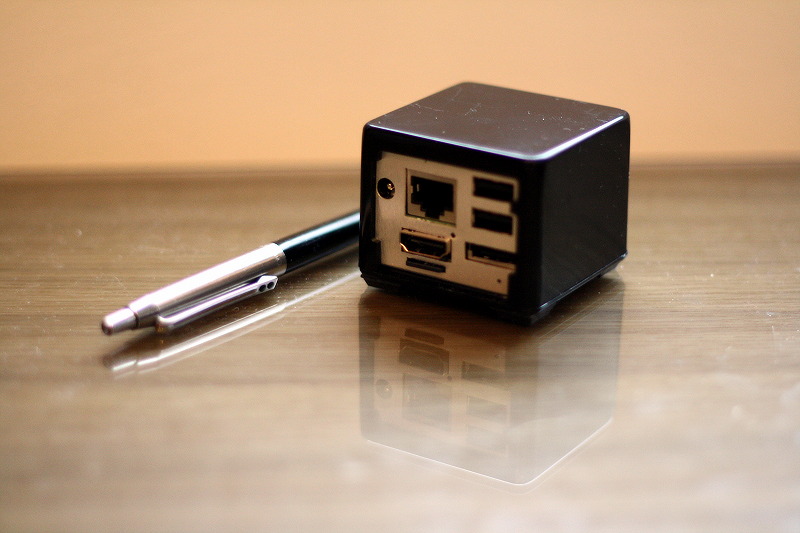
Just recently arrived from DHL, a solid-run CuBox. I guess nobody who knows me will be surprised when I tell it features an ARM cpu. Specifically an Marvell Armada 510. It features ARMv7 compatibility, with a slight twist of replacing NEON extensions with iWMMX extensions. On the boasting side Armada 510 promises 1080p video decoding and OpenGL ES graphics acceleration (closed source, unfortunately).

The tiny form factor of CuBox is pretty much more than the impressive amount of connectors included;

* Gigabit ethernet
* 2*USB
* eSATA
* HDMI out
* s/pdif optical audio out
* microSD slot
* microUSB serial/jtag port

The last item being important as it makes CuBox unbrickable.. Some will probably lament the lack of WiFi/Bluetooth, but get everything in one device ;). Besides, the USB slots are there to be filled..

Getting started was an slightly rough ride, as in the included Ubuntu (10.04 LTS), X refused to start. After wrongly suspecting that my Display was at fault, turned out the microSD included was slightly corrupted, and some critical contents of xkb-data package were garbage. After reinstall of that package, everything worked, including playing Big Buck Bunny in FullHD with totem.

Biggest disappointment so far is the non-mainline kernel, based on old 2.6.32.9. Some mainline support of Armada 510 exist, but will it work with the proprietary graphics code?

Monday, June 27, 2011

QEMU with OpenGL ES acceleration

In the graphics side, the major differences between ARM and X86 systems is that on ARM 3D acceleration is done with OpenGL ES. It is mostly a subset of modern OpenGL used on X86 desktop machines. From QEMU point of view this could mostly be ignored, as OpenGL was mostly used on games and specialist applications. This has now been changing, as desktops and user interfaces have started OpenGL to render graphics. Without acceleration, these user interfaces become slower than slugs crossing a tarpit.

For this reason, MeeGo introduced OpenGL ES acceleration support to QEMU. With the lack of easily available MeeGo QEMU images and test setup, I've created a test setup for Linaro 11.05 image.

Running torus opengl es1 demo from mesa-demos inside QEMU.

Monday, April 4, 2011

Getting replaced by scripts - and it feels good!

As mentioned on Phils blog, Debian buildd's have now capability of autosigning builds. Today when arriving home I was greeted by an empty feeling - There was no builds to sign. The long standing routine had come to an end.

Good system administrators constantly look how to replace themselves with scripts and automation. Bad ones build job security by owning manual processes than nobody else can master.

With signing now done by some code instead of us, I (and other buildd admins) have more time and energy to work on irregular tasks - upgrading chroots, helping developers with porting problems etc. Not to mention blogging and updating ones own packages to sid..

Meanwhile, there are still some issues needing solving - $HOME isn't available on all buildds, -volatile and binNMU's need still manual signing. Certainly not the smoothest update, but it is already making life easier.

Thursday, August 19, 2010

(unnofficial) Bits from ARM porters

Quite a few things have happened recently in the Debian/ARM land

ARM and Canonical have generously provided us with bunch of fast armel machines. Four of these are now as buildd's, bringing the total of armel buildd's to 7. In other words, armel should no longer lag behind other architectures when building unstable packages.

One of machines, abel.debian.org has been setup as a porter box. It is faster (around 3x) than the older porterbox (agricola). All Debian Developers have access to the porterboxes.

The new buildds have allowed us to enable more suites. Thanks to Philipp Kerns work, armel builds now experimental, lenny-volatile, lenny-backports as well as unstable/non-free. Especially if you are using stable Debian, access to backports and volatile should make life happier :)

Finally, the next big thing is Hardfloat ARM port, effort being lead by Konstantinos Margaritis. This doesn't mean that the armel port is going away. Majority of ARM cpus sold are still without FPU, so the softloaf port (armel) will still have a long life ahead. Meanwhile, the armhf port will provide a more optimal platform for people with bleeding edge ARM cores (ARMv7 + vfp). Some people have been unhappy with the new proposed new port, and various alternatives have been proposed. However, armhf is currently the only solution being actively worked on.

Update: thank canonical too

Thursday, February 26, 2009

The not-slug: SheevaPlug

popcon lists approximately 1000 arm/armel Debian installations. There is also listed 864 installations of nslu2-utils, letting us estimate that approximately 85% of debian/arm(el) installations are Linksys nslu2's. It is nicked sympathetically as "The Slug", which pretty accurately describes the performance of nslu2. Still, people have found absolutely amazing amount of ways to use their slugs. What would you do with something approximately 10x more powerful with same prize/size range?

Enter the Marvell SheevaPlug


| What | Slug | SheevaPlug |
| CPU | 266Mhz | 1.2Ghz |
| Cache| 32KB | 32+256KB |
| Flash| 8MB | 512MB |
| MEM | 32MB | 512MB |
| Net | 100Mb | 1Gb |


And that's not everything - SheevaPlug comes with SDIO slot and miniusb to be used as a serial console (and JTAG). No soldering needed for hacking.

Some more details on the LinuxDevices article.

For those of you who think that has one port too few of something, or don't like the wall-wart design, Other devices based on kirkwood SoC (which SheevaPlug is based on) are on the way from various ODM/OEM houses.

Sunday, February 15, 2009

obligatory lenny post


In practice for me, this that I finally had to setup stable buildd chroots for armel (ya!). This makes the Debian the first general purpose distribution to release with a ARM EABI port. Thanks for everyone who made this happen, even when the naysayers were claiming that Debian would be too inflexible for another arm port! The list of people who made this possible is simply too long to include in a blog post, and I'm afraid I would still forget someone...


For squeeze, I hope we can keep the name as the release theme and squeeze minimal Debian install into smaller disk and memory than what it takes with lenny :) For more specific squeeze plans on the armel port, we are looking at least into providing optimized versions of various libs (using HWCAP feature) and extending the amount of hardware supported. Not ARM-related directly, but I'd really like to see #206684 fixed finally.