Monday, May 14, 2012

Mosh - better remote shell

In this age of 3d accelerated desktops and all that fancy stuff, one does not expect practical innovation happening in the remote terminal emulation area. But it has just happened. It is called Mosh, a shorthand for "Mobile Shell".

What does it do better than ssh we have learned to love?

  • Less lag! Being UDP based, it is not prone to TCP congestion effects. Considering that voip, games and everything else latency critical has been UDP based, it is (almost) surprising that it wasn't done for interactive terminals before...
  • Even less lag! Mosh provides local echo and line editing when the other side is not being responsive. To do this, mosh actually becomes a terminal emulator of it's own. This stuff is sweet on unstable 3G and conference wifi networks.
  • Survives suspending. Resume your laptop and *bam* all your remote mutt and vim editors are still there instead of the "connection reset" you get from ssh.
  • Roaming. Got another IP? Moved from wifi to ethernet to 3G? your sessions are still open! Another thing a TCP based protocol couldn't do easily...
It doesn't replace ssh, as it still borrows authentication from ssh. But that's cool, as you can keep your ssh authorized keys.

Available in Debian unstable,testing and Backports today, and many other systems as well. Hopefully an Android client comes available soon, as the above mentioned advantages seem really tailored for android like mobile systems.

Caveat: This is new stuff, and thus hasn't quite been proven to be secure.

Friday, April 27, 2012

Cross Compiling with MultiArch

Congrats to the Ubuntu Folk for the new LTS release. Incidentally this is also the first release where our work on MultiArch bears fruit. We can now cross-compile relatively easily without resorting to hacks like scratchbox, qemu chroot or dpkg-cross/xdeb.

Lets show short practical guide on cross-building Qemu for armhf. The instructions refer to precise, but the goodiness is on the way to Debian as well. Biggest missing piece being the cross-compiler packages, which we have an Summer of Code project. The example is operated in a chroot to avoid potentially messing up your working machine. Qemu-linaro is not a shining example, as cross-building it doesn't work out of box. But that is educational, it allows me to show what kind of issues you can bump into, and how to fix them.

 $ sudo debootstrap --variant=buildd precise /srv/precise
Edit the /srv/precise/etc/apt.sources.list to the following (replace amd64 with i386 if you made an i386 chroot)
deb [arch=amd64] http://archive.ubuntu.com/ubuntu precise main universe
deb [arch=armhf] http://ports.ubuntu.com/ubuntu-ports precise main universe
deb-src http://archive.ubuntu.com/ubuntu precise main universe
Edit the /srv/precise/etc/dpkg/dpkg.cfg.d/multiarch by adding the following line:
foreign-architecture armhf
Finally disable install of recommends by editing /srv/precise/etc/apt/apt.conf.d/10local:
APT::Install-Recommends "0";
APT::Install-Suggests "0";
Install the armhf crosscompiler the chroot
 $ sudo chroot /srv/precise/
 # unset LANG LANGUAGE
 # mount -t proc proc /proc
 # apt-get update
 # apt-get install g++-arm-linux-gnueabihf pkg-config-arm-linux-gnueabihf
Get the sources and try to install the cross-buildeps:
 # cd /tmp
 # apt-get source qemu-linaro
 # cd qemu-linaro-*
 # apt-get build-dep -aarmhf qemu-linaro
As we see, the build-dep bombs out ugly, with a them of "perl" being unable to be installed. This is because apt-get can't figure out if we should install and armhf or amd64 version of perl. We don't use the required syntax yet in Build-Dep line, "perl:any", as dpkg and apt in previous released don't support it. Thus back porting would no longer be possible. One way to fix it, would be to drop perl build-dep, as perl is already pulled by other build-deps. But lets instead show howto install it the build-deps manually. First we build system build-deps, then target architecture ones:
 # apt-get install debhelper texinfo
 # apt-get install zlib1g-dev:armhf libasound2-dev:armhf libsdl1.2-dev:armhf libx11-dev:armhf libpulse-dev:armhf libncurses5-dev:armhf libbrlapi-dev:armhf libcurl4-gnutls-dev:armhf libgnutls-dev:armhf libsasl2-dev:armhf uuid-dev:armhf libvdeplug2-dev:armhf libbluetooth-dev:armhf
And try the build[1]:
 # dpkg-buildpackage -aarmhf -B
Which sadly errors out. Turns out the cross-build support in debian/rules is broken. Instead of --cc we need to feed an --cross-prefix to the ./configure of qemu. Edit the debian/rules with replacing
-  conf_arch += --cc=$(DEB_HOST_GNU_TYPE)-gcc --cpu=$(QEMU_CPU)
+  conf_arch += --cross-prefix=$(DEB_HOST_GNU_TYPE)-
Optional: Since we are cross-compiling from a multicore machine, lets also add parallel building support, by changing the override_dh_auto_build: rule to have --parallel flags in debian/rules as well:
override_dh_auto_build:
        # system build
        dh_auto_build -B system-build --parallel
ifeq ($(DEB_HOST_ARCH_OS),linux)
        # user build
        dh_auto_build -B user-build --parallel

        # static user build
        dh_auto_build -B user-static-build --parallel

Try the build again:
 # export DEB_BUILD_OPTIONS=parallel=4 # I have dual-core hyperthreading machine, build with all four threads
 # time dpkg-buildpackage -aarmhf -B
 ...
dpkg-buildpackage: binary only upload (no source included)

real    18m53.425s
user    65m42.570s
sys     2m50.383s
The Native build of qemu-linaro took 4h 11min.

[1] You should not build as root - but to keep instructions short, I'm not explaining howto add and use a unprivileged user in a chroot. Do as I *say*, not as I *do*!

Wednesday, January 18, 2012

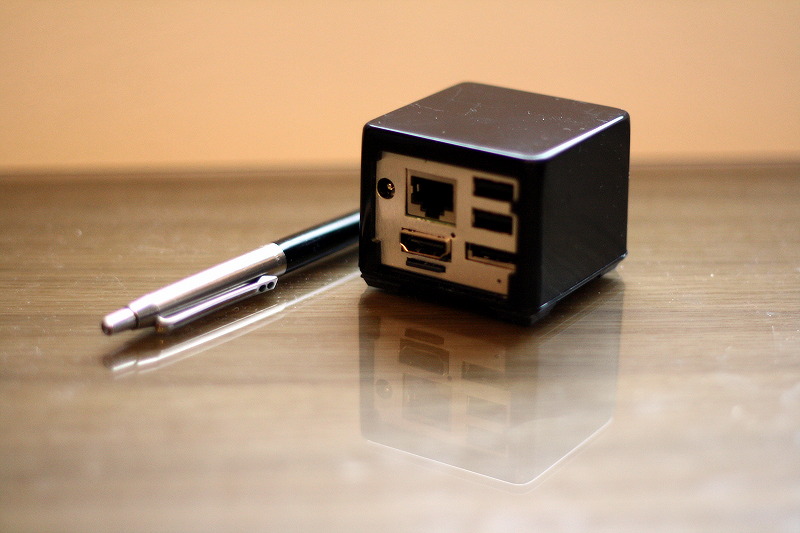
CuBox


Just recently arrived from DHL, a solid-run CuBox. I guess nobody who knows me will be surprised when I tell it features an ARM cpu. Specifically an Marvell Armada 510. It features ARMv7 compatibility, with a slight twist of replacing NEON extensions with iWMMX extensions. On the boasting side Armada 510 promises 1080p video decoding and OpenGL ES graphics acceleration (closed source, unfortunately).

The tiny form factor of CuBox is pretty much more than the impressive amount of connectors included;

* Gigabit ethernet
* 2*USB
* eSATA
* HDMI out
* s/pdif optical audio out
* microSD slot
* microUSB serial/jtag port

The last item being important as it makes CuBox unbrickable.. Some will probably lament the lack of WiFi/Bluetooth, but get everything in one device ;). Besides, the USB slots are there to be filled..

Getting started was an slightly rough ride, as in the included Ubuntu (10.04 LTS), X refused to start. After wrongly suspecting that my Display was at fault, turned out the microSD included was slightly corrupted, and some critical contents of xkb-data package were garbage. After reinstall of that package, everything worked, including playing Big Buck Bunny in FullHD with totem.

Biggest disappointment so far is the non-mainline kernel, based on old 2.6.32.9. Some mainline support of Armada 510 exist, but will it work with the proprietary graphics code?

Monday, June 27, 2011

QEMU with OpenGL ES acceleration

In the graphics side, the major differences between ARM and X86 systems is that on ARM 3D acceleration is done with OpenGL ES. It is mostly a subset of modern OpenGL used on X86 desktop machines. From QEMU point of view this could mostly be ignored, as OpenGL was mostly used on games and specialist applications. This has now been changing, as desktops and user interfaces have started OpenGL to render graphics. Without acceleration, these user interfaces become slower than slugs crossing a tarpit.

For this reason, MeeGo introduced OpenGL ES acceleration support to QEMU. With the lack of easily available MeeGo QEMU images and test setup, I've created a test setup for Linaro 11.05 image.

Running torus opengl es1 demo from mesa-demos inside QEMU.

Monday, April 4, 2011

Getting replaced by scripts - and it feels good!

As mentioned on Phils blog, Debian buildd's have now capability of autosigning builds. Today when arriving home I was greeted by an empty feeling - There was no builds to sign. The long standing routine had come to an end.

Good system administrators constantly look how to replace themselves with scripts and automation. Bad ones build job security by owning manual processes than nobody else can master.

With signing now done by some code instead of us, I (and other buildd admins) have more time and energy to work on irregular tasks - upgrading chroots, helping developers with porting problems etc. Not to mention blogging and updating ones own packages to sid..

Meanwhile, there are still some issues needing solving - $HOME isn't available on all buildds, -volatile and binNMU's need still manual signing. Certainly not the smoothest update, but it is already making life easier.

Thursday, August 19, 2010

(unnofficial) Bits from ARM porters

Quite a few things have happened recently in the Debian/ARM land

ARM and Canonical have generously provided us with bunch of fast armel machines. Four of these are now as buildd's, bringing the total of armel buildd's to 7. In other words, armel should no longer lag behind other architectures when building unstable packages.

One of machines, abel.debian.org has been setup as a porter box. It is faster (around 3x) than the older porterbox (agricola). All Debian Developers have access to the porterboxes.

The new buildds have allowed us to enable more suites. Thanks to Philipp Kerns work, armel builds now experimental, lenny-volatile, lenny-backports as well as unstable/non-free. Especially if you are using stable Debian, access to backports and volatile should make life happier :)

Finally, the next big thing is Hardfloat ARM port, effort being lead by Konstantinos Margaritis. This doesn't mean that the armel port is going away. Majority of ARM cpus sold are still without FPU, so the softloaf port (armel) will still have a long life ahead. Meanwhile, the armhf port will provide a more optimal platform for people with bleeding edge ARM cores (ARMv7 + vfp). Some people have been unhappy with the new proposed new port, and various alternatives have been proposed. However, armhf is currently the only solution being actively worked on.

Update: thank canonical too

Monday, June 7, 2010

WebGL on N900

With the recent "PR1.2" firmware upgrade of Nokia N900, a new feature was enabled in the browser - WebGL. WebGL is cool and scary. The cool part is that it is a chance to bring lots of games to to Linux users. The screenshot is from Match3D, a 3D tic-tac-toe game.

The best way to get started is with the Learning webgl tutorial. Passing through the lessons, some are clearly featuring buggy graphics. I don't know if the website, N900 browser or the OpenGL ES driver is being buggy. Which brings the scary part of WebGL - not only does one need to deal with buggy browsers, one has to deal with buggy 3D hardware/drivers! WebGL is still very much work in progress, and on N900 the webGL is rather an "easter egg" than a proper feature. For example the 3D graphics from the GPU does an extra roundtrip via CPU before appearing on the screen.

Other WebGL resources are for following blogs about WebGL, the Khronos Demo repository and more demos can be found at CubicVR site. The last CubicVR demos feature another scary new browser feature (not yet supported on N900) - audio processing in JavaScript.